
Geofencing for Contractors: Real-Time Crew Accountability Without the Hassle
Geofencing automates crew time tracking with GPS verification, eliminating manual timesheets and buddy punching. Learn how Magic Valley contractors use geofencing to track accountability in real-time and cut payroll processing time in half.
The Accountability Challenge Every Contractor Faces
Your crew left the office at 8 a.m. One tech is supposed to be at a residential HVAC installation. Another is handling a plumbing emergency across town. By noon, you still don't know for certain if they showed up on time, how long they actually spent at each job, or whether they took an unauthorized detour.
You're left guessing, and guessing costs money. Paper timesheets are filled out hours later (or worse, filled out from memory). "Buddy punching" happens when one technician clocks in for another. Travel time gets padded. Billing disputes with customers arise over job duration.
This is the daily reality for contractors managing field teams. But there's a solution that's been quietly transforming operations across Magic Valley and beyond: geofencing.
What Is Geofencing and How Does It Work?
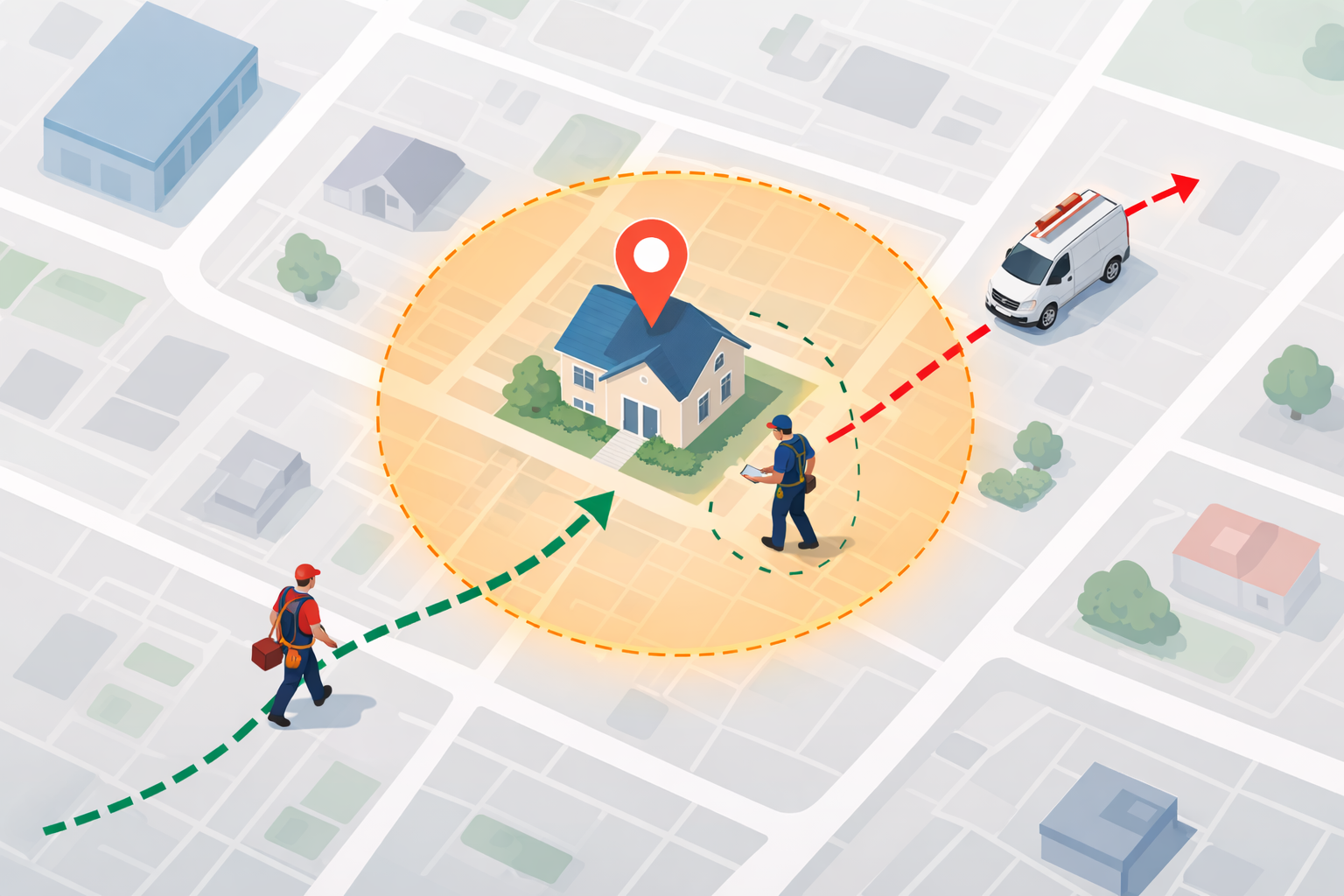
A geofence is a virtual boundary drawn around a real-world location using GPS coordinates. When a tracked person, vehicle, or asset enters or exits this boundary, the system automatically logs the event and can send an instant alert via text, email, or push notification.
In plain English: You draw a virtual circle around a job site on a map. When your crew member's phone enters that zone, they're automatically clocked in. When they leave, they're clocked out. No manual timesheet. No guesswork. Just automatic, location-verified data.
Geofencing is a location-based technology that creates an invisible perimeter around a real-world geographic area. When an employee's mobile device crosses this boundary, predefined actions are triggered, like clock-ins, alerts, or time tracking. The technology works even in areas with poor cell coverage; most modern platforms cache data offline and sync when the connection returns.
Here's what makes it powerful for contractors: Geofenced time tracking automates accurate time collection by creating virtual jobsite boundaries. This eliminates manual errors and significantly reduces payroll fraud, which costs businesses billions annually.
The Real-World Benefits for Your Crew and Bottom Line
Geofencing isn't just about surveillance; it's about operational clarity. Here's what contractors actually see when they implement it:
- Accurate Payroll, Every Time. Supervisors and back-office staff receive live dashboards showing who's on-site, who's off, and how many hours each crew has logged. Field data flows straight into payroll, job-costing, and HR modules, no exports, re-keying or manual imports required. That eliminates hours of administrative work each week.
- Eliminates Time Theft and Buddy Punching. Location verification ensures that only the right worker can clock in at the right site. Your best employees appreciate this; it proves they're being paid fairly, and bad actors can't game the system.
- Settles Billing Disputes Before They Start. By drawing a geofence around each customer's property, the system logs exactly when a crew arrives and how long they stay (called "dwell time"). This data settles billing disputes before they start. When a customer claims "your tech was only here 10 minutes," you have proof showing 47 minutes of documented work.
- Improves Resource Allocation and Scheduling. When integrated into broader jobsite hours management software, geofencing enables project managers to make data-driven decisions. Whether it's reallocating labor, adjusting timeline, or responding to site-specific issues, having real-time location data gives teams the edge they need to stay efficient.
- Reduces Admin Burden Dramatically. Automated logs reduce the back-and-forth between the field and the office. One Magic Valley plumbing contractor reported cutting payroll processing time from two hours to 30 minutes after implementing geofenced time tracking.
How It Solves Magic Valley Contractor Headaches
Magic Valley contractors operate in diverse environments. You might have technicians working on residential jobs in town, commercial HVAC installations at the mall, emergency service calls scattered across the region, and routine maintenance across multiple customer accounts on the same day.
GPS tracking directly addresses these challenges by providing detailed data on employee movements, activities, and adherence to schedules. GPS tracking systems allow managers to monitor the real-time location of employees, ensuring they are where they're supposed to be during work hours. This capability minimizes time theft and unauthorized detours.
For HVAC contractors specifically, geofencing eliminates disputes over installation or service times. For plumbing crews managing emergency calls, it verifies arrival times and proves how long teams spent on-site. For multi-crew operations, it shows which crew is closest to the next job, enabling faster dispatching and better job allocation.
Unlike big enterprise software that treats field service as an afterthought, solutions built for contractors integrate geofencing with the rest of your workflow. Rather than buying separate apps for scheduling, time tracking, dispatch, and CRM, you get one platform where geofencing feeds directly into your job management, invoicing, and payroll.
Implementation: The Right Way
Geofencing works best when rolled out thoughtfully. Here's how successful contractors implement it:
- Be Transparent From Day One. A well-structured GPS tracking policy helps set clear expectations, prevents misunderstandings, and creates a healthier balance between accountability and privacy. When rolled out thoughtfully, GPS tracking becomes a win-win: Employees feel protected and respected. Managers gain the visibility needed to optimize workflows. The entire organization benefits from greater efficiency, safety, and service quality. Tell your crew why you're implementing it (operational efficiency, accurate payroll, fair billing), not as punishment.
- Set Geofence Zones Carefully. Draw boundaries around actual job sites, not arbitrarily. If a customer address is used, make sure the zone is large enough to account for GPS variance (usually 10-20 meters).
- Use It as a Tool, Not a Weapon. Real-Time Updates: Employees can use GPS tools to notify managers of delays, changes in schedules, or unexpected obstacles. Mutual Visibility: With access to GPS data, employees feel confident that their efforts are visible and appreciated. This mutual transparency fosters trust and ensures that both parties are aligned in their goals.
- Sync with Payroll and Job Costing. The real value emerges when geofenced time data flows directly into invoicing and payroll systems, eliminating manual re-entry.
Beyond Geofencing: The Complete Picture
Geofencing is powerful, but it works best as part of a complete field service platform. Accurate time tracking alone doesn't improve profitability if you're still manually scheduling jobs, managing customer communication through phone calls, or chasing down payment after work is complete.
The contractors experiencing the biggest wins combine real-time crew tracking with smart scheduling, automated customer communication, and integrated payments. When a geofenced clock-in triggers a job as "in progress," you can automatically notify the customer of arrival. When the clock-out happens, you can send a photo-documented invoice and payment link within minutes.
Think of geofencing as the first domino. It gives you the data. A complete platform turns that data into action, faster invoicing, better crew utilization, and happier customers.
Frequently Asked Questions
Q: Is geofencing legal for tracking employees?
While GPS tracking of employees is still relatively new and thus not commonly addressed in State and Federal laws, some states enforce general employee privacy guidelines to abide by. The key is transparency: inform employees in writing, explain the business purpose, and only track during work hours. When implemented honestly, not as secret surveillance, it's legal and fair.
Q: Does geofencing work if my crew has poor cell service?
Yes. Field crews often work in areas with poor cell service. Top apps store data locally and sync later when the connection returns. The geofence clock-in is recorded on the phone, and once your technician gets back to an area with signal, the data syncs to your office system.
Q: Can geofencing prevent buddy punching?
Location verification ensures that only the right worker can clock in at the right site. A technician can't clock in from home and have another crew member show up to the job. The system requires their phone to be physically at the geofenced location. Some platforms add photo verification for extra certainty.
Q: How much time does geofencing save on payroll?
Automated logs reduce the back-and-forth between the field and the office. Contractors report cutting payroll processing time by 50-70% when switching from manual timesheets to geofenced tracking. That's 5-10 hours of admin work recovered each week, time you can spend on business growth.
Q: What if a crew member's phone dies during a shift?
Most geofencing platforms allow manual time entry by supervisors as a backup. Some also let crews use alternative methods (PIN codes, badges, or QR codes at job sites) for situations where phones fail. The goal is accurate data, not perfect automation.
Take Control of Your Crew's Day
Geofencing transforms crew accountability from a guessing game into a transparent, automated system. But the real power emerges when it's woven into your entire operation, scheduling, dispatch, job tracking, communication, and payments all working together.
FieldServ AI integrates geofencing with complete job lifecycle management, so your crews are tracked, your jobs are dispatched efficiently, and your invoices go out within hours of completion. See how real-time job tracking works within a unified field service platform designed specifically for contractors like you.
Ready to stop chasing timesheets and start managing data-driven operations? Start your free 21-day trial of FieldServ AI, no credit card required. You'll see geofencing in action, integrated with scheduling, dispatch, and payroll, within your first week. Magic Valley contractors are already saving 20+ hours weekly in admin work alone.
Tags
Written by
FieldServ AI Team
Field service management insights from the FieldServAI team.
Related Articles
April Permit Delays Cost Magic Valley Contractors $2K+/Week
April permit delays are draining Magic Valley contractors $2K+ weekly. Learn how field service management software prevents the chaos and protects your revenue.

5 ROI Myths Costing Contractors $50K a Year (And the Math That Disproves Each One)
Five common beliefs stop contractors from adopting field service software. University and MIT research disproves each one. This post shows the real math behind what spreadsheets, missed calls, and slow invoicing cost.

Seasonal vs. Year-Round Pricing: Which Drives More Profit for Magic Valley Contractors
Seasonal pricing can boost profit 4-15% above flat rates. Learn which strategy—seasonal, year-round, or hybrid—actually generates more profit for Magic Valley HVAC, plumbing, and electrical contractors.
Ready to Modernize Your Field Operations?
FieldServ AI helps service companies streamline scheduling, dispatching, and customer management.
Get Started Free