
7 Warning Signs Your Field Service Business Has Outgrown Spreadsheets in 2025
TL;DR If you're a contractor or service business owner in Magic Valley still managing jobs with spreadsheets, you're not alone—but you might be leaving serious money on the table. This guide covers 7 warning signs that it's time to upgrade to field service management software: excessive admin time,

TL;DR
If you’re a contractor or service business owner in Magic Valley still managing jobs with spreadsheets, you’re not alone—but you might be leaving serious money on the table. This guide covers 7 warning signs that it’s time to upgrade to field service management software: excessive admin time, scheduling conflicts, lack of mobile access, missed follow-ups, collaboration struggles, poor reporting capabilities, and growth limitations. Magic Valley contractors using modern software report saving 8-12 hours weekly and getting paid 20+ days faster. Learn how to identify if spreadsheets are holding back your growth and what to do about it.
It’s 6:30 PM on a Tuesday. You’re sitting at your kitchen table in Twin Falls, staring at three different spreadsheet tabs on your laptop. One tracks your schedule. Another manages customer information. The third is supposed to help you track which invoices are still unpaid—but you haven’t updated it in two weeks.
Your phone buzzes. It’s your lead technician: “Which job am I doing first tomorrow? The spreadsheet shows two appointments at 8 AM.”
You sigh. Again.
Here’s the thing: you’re not doing anything wrong. Spreadsheets are how most successful field service businesses start. They’re free, familiar, and flexible enough to handle your basic needs when you’re just getting off the ground.
But there comes a point—a tipping point—where the tools that got you here won’t get you where you want to go.
If you’re reading this, you’re probably at that point. Or close to it. And that’s actually good news. It means your business is growing. The challenge is recognizing when spreadsheet management is costing you more than it’s saving you.
In communities like Twin Falls, Jerome, and throughout Magic Valley, service businesses are growing at 23% year-over-year. The contractors who are scaling successfully? They’ve all made one critical transition: from manual spreadsheet juggling to field service management software.
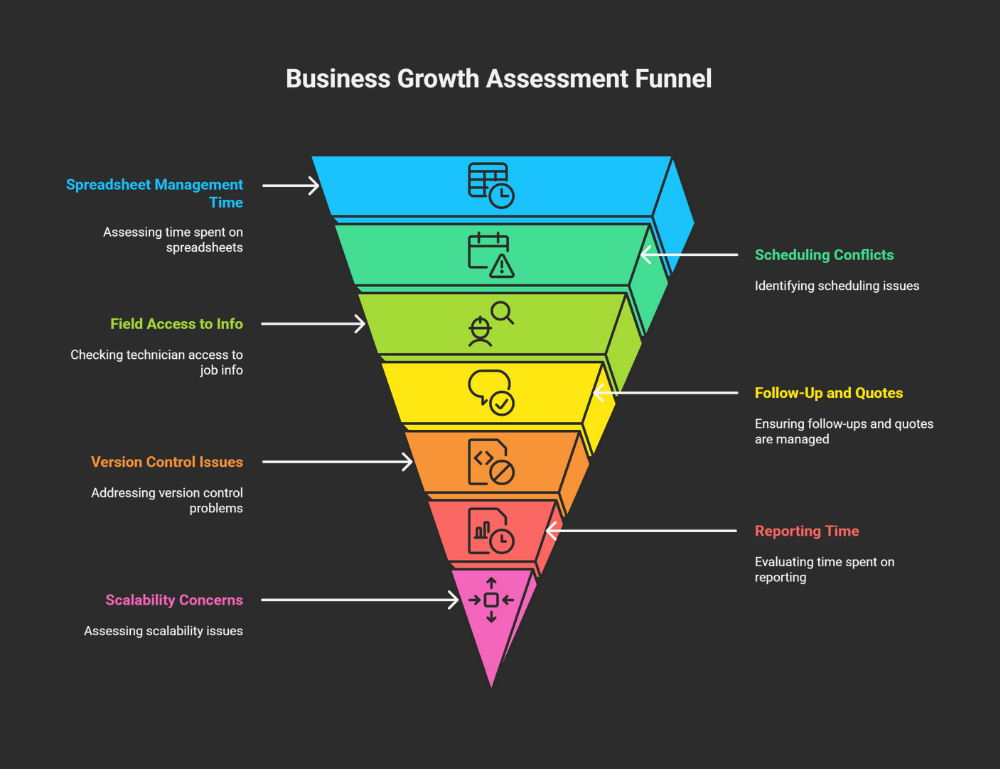
This article will show you the seven warning signs that it’s time to make that switch. If you recognize yourself in three or more of these scenarios, your spreadsheets aren’t just limiting your efficiency—they’re limiting your income.
Why Magic Valley Service Businesses Start With Spreadsheets (And Why That’s OK)
Let’s be honest: when you first started your field service business, spending money on software probably felt unnecessary. You had Excel or Google Sheets, you knew how to use them, and they were free. Why pay for something when you could build it yourself?
That’s smart thinking for a solo operator or a very small team. Spreadsheets offer flexibility that off-the-shelf software sometimes doesn’t. You can customize columns, create your own formulas, and organize information exactly the way your brain works.
The typical progression looks like this:
Stage 1: You’re solo. One spreadsheet tracks everything—customers, jobs, income, expenses. It takes maybe an hour a week to maintain. Totally manageable.
Stage 2: You hire your first technician. Now you need separate tabs for scheduling, customer info, and job notes. You spend 3-4 hours weekly keeping everything updated. Still doable.
Stage 3: You’re up to 3-5 team members. You’ve got multiple spreadsheet files. Version control becomes an issue. Someone’s always working on “the wrong version.” You’re spending 8-10 hours a week just on spreadsheet management. This is where the cracks start showing.
Stage 4: Growth plateau. You want to hire more people, take on more jobs, expand your service area—but your systems can’t handle it. Spreadsheets have become the bottleneck.
Most Magic Valley contractors we talk to are somewhere between Stage 3 and Stage 4. They built their businesses on grit, great work, and Google Sheets. And there’s no shame in that. Idaho values practicality, bootstrapping, and being cost-conscious. Those are business virtues.
But here’s what many don’t realize: staying with spreadsheets past Stage 3 isn’t being practical anymore. It’s actually costing you money. Real money. Let’s look at exactly how much.
The Hidden Costs of Spreadsheet Management
When you think about the cost of spreadsheets, you probably think: “Zero dollars. They’re free.”
But free software can be the most expensive thing you use.
Let’s do the math on what spreadsheet management actually costs your Magic Valley service business:
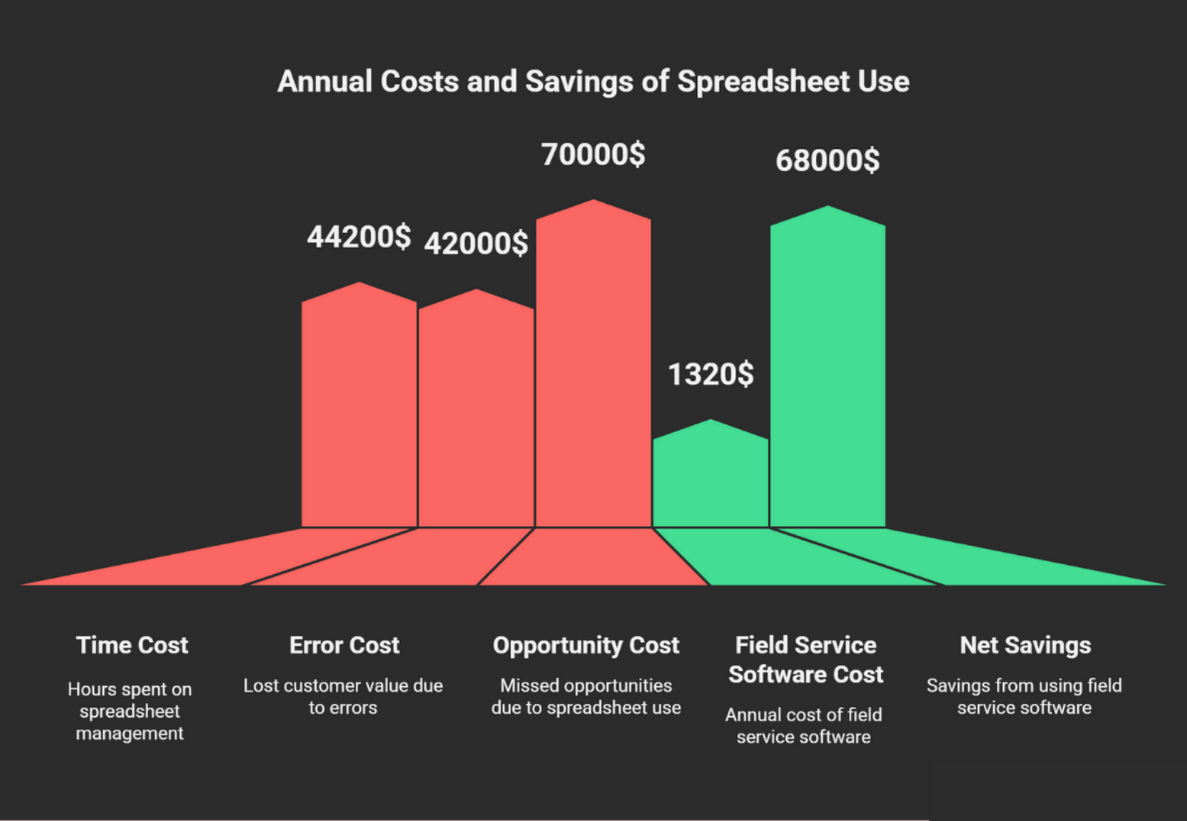
Time Cost: If you’re spending 10 hours per week maintaining spreadsheets, scheduling jobs, updating customer information, and fixing errors, that’s 520 hours per year. As a skilled contractor in Magic Valley, your billing rate is probably between $75-125 per hour. Let’s use $85 as a conservative average.
520 hours × $85/hour = $44,200 in lost billable time per year
That’s not theoretical money. That’s real revenue you could be earning if you weren’t stuck updating spreadsheet cells.
Error Cost: Manual data entry has an error rate of 15-20%. That means roughly one in every five to six entries has a mistake—wrong time, wrong address, incorrect invoice amount, duplicate booking.
According to IBM research, data quality issues cost businesses an average of $3.1 million annually. For small businesses, even a fraction of that impact is significant. Let’s be conservative and estimate that errors cost you just one lost customer per month due to scheduling mistakes, missed follow-ups, or billing confusion.
Average customer lifetime value in service businesses: $3,500-5,000. Lost referrals from that unhappy customer: 2-3 additional potential customers.
One error per month = $42,000-60,000 in lost customer value annually
Opportunity Cost: This is the big one that most contractors don’t calculate. Every hour you spend wrestling with spreadsheets is an hour you’re not:
- Taking on another profitable job
- Following up with leads
- Training your team
- Marketing your business
- Building relationships in the community
During Magic Valley’s busy seasons—summer HVAC rush, spring irrigation system maintenance, pre-winter plumbing prep—can you afford to spend 10+ hours weekly on administrative tasks?
The technical term for what’s happening is “technical debt.” You’re borrowing time from your future by patching together systems that require constant maintenance. Eventually, that debt comes due—usually at the worst possible moment, like when you’re trying to scale.
When you add it all up—time cost, error cost, and opportunity cost—spreadsheet management is likely costing your business $60,000-80,000 per year in direct and indirect losses.
The question isn’t whether you can afford field service management software. The question is: can you afford to keep using spreadsheets?
Sign #1 – You’re Spending More Time Managing Spreadsheets Than Running Service Calls
Let’s paint a picture of your typical Monday morning:
You wake up at 5:30 AM. Before you’ve had your coffee, you’re opening your laptop to update the schedule. Customer A called last night and needs to reschedule. Customer B’s job took longer than expected on Friday, so you need to push back Tuesday’s appointments. Customer C just texted that they need emergency service today.
You spend 45 minutes shuffling the schedule, color-coding cells, updating multiple tabs, and copying information between your “Master Schedule” and your “Technician Assignments” sheets. Then you have to text or call each technician individually with their updated schedule.
By 7 AM, you’re already mentally exhausted, and you haven’t even turned a wrench yet.
Does this sound familiar?
Here’s the reality check: if you tracked your time for one week, you’d probably discover you’re spending 10-15 hours on spreadsheet-related tasks. That’s nearly two full work days of just managing information instead of delivering service.
Compare that to field service scheduling software. When a customer needs to reschedule, they can do it themselves through an online portal, or you make the change once, and it automatically:
- Updates the schedule
- Notifies the affected technician via push notification
- Adjusts subsequent appointments if needed
- Updates customer communication
- Logs the change for your records
Total time: 30 seconds. Not 45 minutes.
Ask yourself this question: Last week, how many hours did you spend opening, updating, and organizing spreadsheets? If the answer is more than five, you’re spending more than 10% of your work week on administrative overhead. That’s not sustainable as you grow.
The Twin Falls HVAC contractor who used to spend three hours every Sunday night planning the week’s schedule? He switched to automated scheduling last year. Now it takes him 20 minutes. He says that alone was worth the software cost—everything else is a bonus.
Sign #2 – Double-Bookings and Scheduling Conflicts Happen Weekly
You’ve been there. Your technician shows up at a customer’s home at 9 AM, ready to work. The customer looks confused: “I thought you were coming at 2 PM?” Or worse: “I didn’t know you were coming today at all.”
Or the opposite happens. Two technicians show up at the same house at the same time because someone entered the job in the wrong row, or updated one spreadsheet but forgot to update the master schedule.
These aren’t just embarrassing moments. They’re reputation killers.
In Magic Valley’s tight-knit service community, word travels fast. When Mrs. Johnson in Jerome tells her neighbor about the plumbing company that scheduled her twice and showed up zero times, that story spreads. You’ve just lost not one customer, but potentially a dozen through the ripple effect.
The root problem? Spreadsheets can’t prevent real-time conflicts. They’re static documents. If two people are working on different versions, or if someone makes an entry without checking the whole schedule, double-bookings happen. There’s no alert system, no conflict detection, no automatic validation.
Modern field service scheduling software treats your calendar like an intelligent assistant. When you try to schedule a job, it:
- Checks technician availability in real-time
- Considers travel time between jobs
- Flags conflicts before they’re created
- Accounts for estimated job duration
- Adjusts automatically if a job runs long
Studies show that companies using proper scheduling systems reduce double-bookings by 94%. Customer satisfaction with appointment reliability increases by 37%.
More importantly, think about this from your customer’s perspective. When you show up exactly when you said you would, you stand out. In a market where many contractors are still disorganized, reliability becomes your competitive advantage.
The Magic Valley challenge: This problem is amplified in our region because service areas are spread out. If you’ve got jobs scheduled in Twin Falls, Jerome, and Burley on the same day, poor scheduling doesn’t just frustrate customers—it wastes hours of drive time and fuel costs. You need systems that optimize routing, not just track appointments.
And during weather events—sudden winter storms, spring floods affecting irrigation systems, summer heat waves straining HVAC—your scheduling needs to be dynamic. Spreadsheets can’t keep up with that kind of rapid change.
If your team has had more than two scheduling conflicts in the past month, your system is failing you. That’s your sign.
Sign #3 – Your Technicians Can’t Access Information in the Field
Picture this scenario: Your technician arrives at a customer’s home for a follow-up repair. He needs to know what was done during the last visit, what parts were ordered, and what the customer was quoted.
He doesn’t remember. So he calls you. You’re on another job site. You put down your tools, find your laptop, open the right spreadsheet file, search for the customer name, find the notes, and relay the information over a scratchy cell phone connection.
Total interruption time: 15 minutes for you, 10 minutes for him. Multiply that by the 3-5 times this happens per day, and you’ve wasted 1-2 hours of combined productivity.
Now multiply that by five workdays. Then by 50 work weeks per year.
You’re losing 250-500 hours annually just because your technicians can’t access job information on their phones.
But it’s not just about wasted time. It’s about how you appear to the customer. When your technician has to call the office for basic information, it signals disorganization. When he shows up with a printed spreadsheet that’s coffee-stained and two weeks old, it undermines your professionalism.
Contrast that with a mobile field service app. Your technician pulls up to the job site, opens the app on his phone, and instantly sees:
- Complete customer history
- Photos from the previous visit
- Parts inventory in his truck
- Step-by-step job instructions
- Customer’s preferred payment method
- Any special notes or access instructions
He looks prepared. He is prepared. The customer notices.
The Magic Valley factor: This is especially critical for rural service calls. When you’re driving out to a ranch property 30 miles from town, you can’t afford to forget a part or lack information. And cell service can be spotty in some areas, so you need mobile software with offline capability—the ability to access information even without internet, then sync when you’re back in range.
Modern mobile field service apps are designed for exactly this scenario. They work offline, sync automatically, and put your entire business database in your pocket.
If your technicians are calling the office more than once per day for information that should be at their fingertips, that’s your sign that spreadsheet limitations are costing you money and credibility.
Sign #4 – Follow-Up Tasks and Quotes Slip Through the Cracks
How many potential jobs did you lose last month because you forgot to follow up with a quote?
If you’re being honest, you probably don’t know. And that’s exactly the problem.
Here’s how it happens: You do a service call. Customer asks if you can give them a quote for additional work—maybe installing a new water heater, upgrading their electrical panel, or adding a second HVAC zone. You say, “Absolutely, I’ll get that to you by the end of the week.”
You mean it when you say it. But then you get busy. Three emergency calls come in. Another customer has questions about their bill. You’re training a new hire. By Friday, you’ve completely forgotten about that quote.
The customer waits a few days, then calls your competitor. They get the job. You never even knew you lost it.
This happens constantly with spreadsheet-based management. There’s no automated reminder system. It’s all dependent on your memory—and human memory is terrible at tracking dozens of commitments simultaneously.
According to sales research, 80% of deals require five or more follow-ups after initial contact, but 44% of salespeople give up after just one. In field service, where you’re juggling actual labor alongside business development, those follow-up rates are even worse.
Every missed follow-up represents lost revenue. Let’s be conservative:
- Average quote value: $1,500
- Quotes you forget to send: 2 per month
- Close rate if you’d sent them: 30%
- Lost revenue per year: $10,800
That’s just the direct loss. The indirect loss—that customer goes to your competitor, has a good experience, and refers others to them instead of you—compounds the damage.
Field service automation tools solve this through automated task management:
- Customer asks for a quote → System creates a task with a deadline
- You haven’t sent the quote by the deadline → You get a reminder notification
- Customer receives quote → System schedules automatic follow-up in 3 days
- No response after 7 days → System prompts you to call
These aren’t just conveniences. They’re revenue protection systems.
The Magic Valley context: In smaller markets, your reputation spreads through word-of-mouth. When you tell a customer you’ll do something and then don’t follow through, it doesn’t just cost you that one job. It costs you referrals. In communities where everyone knows everyone—through church, kids’ sports leagues, local business groups—reliability matters even more.
During busy seasonal windows—spring irrigation turnon, fall winterization, summer cooling emergencies—can you really trust yourself to remember every follow-up commitment? Or would you rather have a system that remembers for you?
If you’ve ever had the sinking feeling “I’m forgetting something important” without being able to remember what it is, that’s your sign. Spreadsheets don’t remind you. Software does.
Sign #5 – Multiple Team Members Can’t Work on the Same Data Simultaneously
“Which version of the schedule are you looking at?”
If you’ve asked that question more than once this month, you know this pain intimately.
Here’s how the version control nightmare unfolds:
Monday morning, you update the master schedule on your office computer. Your office manager downloads a copy to track billing. Your lead technician opens it on his laptop to check his assignments. By noon, there are three versions of “the schedule” in existence.
Your office manager updates customer information in her copy. Your technician adds notes about a job delay in his copy. You add two new appointments in yours. By end of day, the three spreadsheets have diverged. Which one is accurate? Nobody knows for certain.
Tuesday morning, you try to reconcile the differences. It takes 90 minutes to manually compare the files and merge the changes. And you’re never entirely sure you caught everything.
Even if you’re using Google Sheets for real-time collaboration, you run into different problems:
- Someone accidentally deletes a row and doesn’t notice
- Two people edit the same cell simultaneously, and one person’s change wins
- The spreadsheet gets so large it takes 30 seconds to load
- You can’t restrict access—everyone can see everything, including sensitive customer payment information
Now let’s talk about onboarding a new employee. You have to train them on:
- Which spreadsheet is the master
- Where to find customer information
- How to read your color-coding system
- What the abbreviations in column H mean
- Never to sort just one column (because it breaks everything)
- The specific formulas they shouldn’t touch
Your new hire looks at the 47 columns in your spreadsheet and feels overwhelmed before they’ve completed their first day.
Contrast this with centralized job management software for contractors. Everyone logs into the same system. There’s only one version of the truth. When someone makes a change, everyone sees it instantly. Permissions control who can edit what. New employees get a clean interface designed for users, not a complex spreadsheet designed by you in a moment of caffeine-fueled inspiration three years ago.
Real scenario from a Jerome electrical contractor: “I hired two new guys last summer. Training them on our spreadsheet system took four days of constant hand-holding. This year, I switched to proper software. New hire onboarding? Two hours. They were productive by lunch on day one. That time savings alone—times two employees—paid for the software for six months.”
The scalability issue is critical. With spreadsheets, every new team member you add creates exponentially more complexity and coordination overhead. With proper contractor business management systems, adding users is linear—each new person gets a login, a role, and they’re integrated into the workflow immediately.
If you’ve ever spent more than 30 minutes reconciling different versions of the same file, or if you dread training new employees on your “system,” that’s your sign.
Sign #6 – You Can’t Generate Business Insights Without Manual Analysis
Quick question: Which of your services is most profitable per hour worked?
Take a minute to figure it out. Go ahead, we’ll wait.
Can’t answer immediately? That’s the reporting problem.
Your business generates valuable data every single day—which customers pay fastest, which services have the highest margins, which technician completes jobs most efficiently, which marketing channels bring in the best leads, which times of year you should be staffing up.
All of that intelligence is trapped in your spreadsheets, invisible until you spend hours manually analyzing it.
Here’s what typically happens when you want to answer a business question:
Question: “Should I focus more on residential or commercial work next quarter?”
Spreadsheet process:
- Open your job history spreadsheet (20 minutes to find the right version)
- Manually calculate revenue by job type (45 minutes of formula writing)
- Pull your expense data from a different spreadsheet (15 minutes)
- Try to calculate profit margins, realize you don’t have complete cost data (frustration mounts)
- Give up and make a gut-feel decision based on incomplete information
Total time: 90+ minutes of analysis for a partial answer.
Meanwhile, your competitors using field service management software? They click a button and get a dashboard showing:
- Revenue by service type
- Profit margins by category
- Trend lines over time
- Comparisons to previous quarters
- Recommendations based on the data
Analysis time: 30 seconds.
The business intelligence gap compounds over time. Without clear visibility into what’s working and what isn’t, you make decisions based on intuition instead of data. Sometimes your intuition is right. Often, it’s not.
Magic Valley opportunity example: Let’s say data showed that your irrigation maintenance service has a 38% profit margin while your emergency repair calls only have 18% margin—but emergency calls take three times longer. Armed with that insight, you might shift your marketing to attract more scheduled maintenance work and be more selective about emergency calls.
But if you don’t know those numbers, you just take whatever work comes in the door, never optimizing for profitability.
Service business technology should show you:
- Real-time profitability by service line
- Technician efficiency metrics
- Customer payment patterns
- Seasonal demand forecasting
- Geographic concentration of your best customers
- Marketing ROI by channel
These aren’t luxuries. They’re essentials for strategic growth. Businesses with real-time dashboards grow 25-30% faster than those flying blind with manual reporting.
If you can’t answer basic profitability questions about your business without spending at least an hour analyzing spreadsheets, that’s your sign that you’ve outgrown them.
Sign #7 – You’re Ready to Scale But Your Systems Can’t Keep Up
This is the ultimate sign, and ironically, it’s a good problem to have.
Your business is succeeding. Demand is strong. You could take on more work—maybe even double your revenue—if you just had the capacity. You want to hire more technicians, expand your service area, add new service lines.
But there’s a voice in your head saying: “If I’m this overwhelmed now with five employees, how will I possibly manage ten? The chaos will be unbearable.”
That voice is right. Your current systems won’t scale.
Spreadsheet management doesn’t scale linearly. It scales exponentially. Going from managing two technicians to four doesn’t double the complexity—it quadruples it. The number of potential scheduling conflicts, version control issues, communication breakdowns, and coordination failures multiplies with every person you add.
You’ve hit what business consultants call the “systems ceiling.” Your business can’t grow past a certain point because your operational infrastructure can’t support more volume. The painful irony is that success—more customers wanting your service—creates failure because you can’t deliver quality at higher volume with manual systems.
We see this constantly with Magic Valley service businesses. They’re great at their trade. Customers love their work. Demand is strong. But they plateau at 3-5 employees because growing beyond that point would require an office manager just to handle spreadsheet coordination, and the math doesn’t work.
Here are the specific breaking points:
Number of jobs: Once you’re completing more than 40 jobs per month, manual scheduling becomes unmanageable.
Team size: With more than 4 field technicians, coordination through spreadsheets breaks down.
Service area: If you’re covering multiple cities (Twin Falls, Jerome, Burley, Gooding), routing optimization becomes critical—and spreadsheets can’t do it.
Service diversity: If you offer more than 5-6 distinct service types, tracking inventory, pricing, and specialized skills requires database-level management, not spreadsheets.
The contractors who successfully scale past these breaking points all have one thing in common: they stopped trying to make spreadsheets do things spreadsheets weren’t designed to do.
Real example: A Twin Falls HVAC company was stuck at $600K annual revenue for three years. Owner was working 70-hour weeks. Couldn’t hire more techs because “it would just create more chaos.” Made the switch to integrated field service software for small business in January. By December, they’d grown to $980K revenue with the owner working 50-hour weeks. He describes the software as “the team member I didn’t know I needed—the one who never sleeps and never forgets anything.”
The growth ceiling isn’t about your skill or work ethic. It’s about system capacity.
When you think about hiring your next technician and feel dread instead of excitement, that’s your sign. When growth opportunities feel threatening instead of energizing, that’s your sign. When you know you’re leaving money on the table but can’t figure out how to pick it up without working 80-hour weeks, that’s your sign.
Your spreadsheets got you to this level. They won’t get you to the next one.
What Field Service Management Software Actually Does (And Why Magic Valley Contractors Are Making the Switch)
Let’s demystify what we’re actually talking about when we say “field service management software.”
It’s not some complex enterprise system that requires an IT degree to operate. It’s not going to take months to implement. And it’s not going to cost you a second mortgage.
Modern field service management software is essentially an integrated system that handles everything involved in running a service business:
Scheduling & Dispatch:
- Drag-and-drop calendar that prevents conflicts
- Automatic technician assignment based on skills, location, and availability
- Route optimization to minimize drive time
- Real-time schedule updates that sync to technician mobile apps
- Customer self-scheduling portals for routine appointments
Customer Relationship Management (CRM):
- Complete customer history in one place
- Service records, communication logs, payment history
- Automated follow-up reminders
- Customer portal for self-service
- Review and referral request automation
Job Management:
- Digital work orders with photos, signatures, and notes
- Checklists to ensure quality and consistency
- Time tracking for accurate job costing
- Parts and inventory management
- Before/after photo documentation
Invoicing & Payments:
- Automatic invoice generation from completed jobs
- Multiple payment options (card, ACH, financing)
- Automated payment reminders
- Real-time payment tracking
- Integration with accounting software
Reporting & Analytics:
- Real-time profitability dashboards
- Technician performance metrics
- Customer lifetime value analysis
- Forecasting and capacity planning
- Custom reports for any business question
Mobile Access:
- Full functionality on smartphones and tablets
- Offline capability for rural areas with spotty service
- GPS tracking for route optimization
- Digital signature capture
- In-field payment processing
The key difference from spreadsheets? Everything is connected. When a job is scheduled, the customer automatically gets a confirmation. When the job is completed, an invoice is automatically generated and sent. When payment is received, the accounting is automatically updated. No duplicate data entry. No information falling through the cracks.
Common concerns addressed:
“Isn’t this expensive?” Quality field service management software ranges from $50-150 per user per month. Remember that spreadsheet cost calculation earlier? You’re currently spending $60K-80K per year in hidden costs. Even at $150/month for three users ($5,400/year), you’re saving $54K+ annually. The ROI is immediate and dramatic.
“Will it be hard to learn?” Modern systems are designed for tradespeople, not tech people. If you can use a smartphone, you can use these systems. Most contractors are fully productive within a week. The best providers offer hands-on onboarding—someone actually walks you through setup and training, not just a help doc.
“What if it doesn’t work for my specific business?” The best systems are configurable. You’re not forced into someone else’s workflow. You can customize fields, create custom service types, set your own pricing structures, and configure notifications the way you want them.
Why Magic Valley contractors specifically are switching:
Local contractors who’ve made the transition consistently mention three factors:
- Time savings: The average is 8-12 hours per week. That’s real time you can spend on the tools or with family, not at a desk.
- Payment speed: Automated invoicing and reminders reduce average payment time from 35-45 days to 12-18 days. That cash flow improvement alone often covers the software cost.
- Professional image: Customers notice when you show up with real-time job information on a tablet, capture their signature digitally, and send them an invoice before you leave their driveway. It positions you as a modern, professional operation.
In Magic Valley’s competitive service market, where reputation and referrals drive growth, these advantages matter. The contractors growing fastest aren’t necessarily the best at their trade—they’re the ones who’ve built systems that let them scale quality service.
One Jerome plumber put it this way: “I always thought I was in the plumbing business. Turns out I’m in the service business that happens to fix pipes. Once I understood that distinction, investing in service software was obvious.”
If you’re still on the fence about whether field service management software is right for your business, go back and count how many of the seven signs you recognized. If you checked three or more, the data is clear: your business has outgrown spreadsheets. The only question is how long you’ll wait before doing something about it.
Making the Switch: What to Look for in Field Service Management Software
Not all field service software is created equal. Some systems are designed for enterprise companies with hundreds of technicians and dedicated IT departments. Others are so simplified they don’t actually solve your problems—they’re just digital versions of the spreadsheet you already have.
For Magic Valley contractors and small service businesses, here’s what to look for:
Must-Have Features:
Mobile-first design: Your technicians need full functionality on their phones, not watered-down mobile access. The system should work offline (critical for rural Idaho service calls) and sync automatically when connection is restored.
All-in-one integration: The whole point is to stop juggling separate tools. Make sure the system includes CRM, scheduling, dispatch, invoicing, payment processing, and reporting in one platform. If you have to integrate five different services, you’ve just recreated the same problem.
Easy customer communication: Automated confirmations, reminders, and follow-ups should be built in, with options for text, email, and push notifications. Your customers have communication preferences—your system should accommodate them.
Local support: This is huge. When you need help, you don’t want to wait three days for an email response from a help desk in another country. Look for providers that offer real phone support from people who understand service businesses.
Reasonable pricing: Transparent pricing with no hidden fees. You should know exactly what you’re paying monthly or annually, including per-user costs as you grow. Avoid systems that require long-term contracts—you should be free to leave if it doesn’t work for your business.
Nice-to-Have Features:
- Integration with QuickBooks or other accounting software you already use
- Customer self-scheduling portals
- Automatic review and referral request tools
- Website integration for lead capture
- Marketing automation capabilities
- Equipment/asset tracking for maintenance contracts
Red Flags to Avoid:
Complex implementation: If the provider says implementation takes 2-3 months, that’s too complicated for a small service business. You should be up and running in days, not months.
Per-text or per-email fees: Some systems charge for every automated text or email sent. Those costs add up quickly. Look for systems with unlimited communication.
No mobile app: If the system is desktop-only or has limited mobile functionality, keep looking. Field service is mobile by definition.
Poor reviews about customer support: Check reviews specifically about the support experience. Great software with terrible support is worthless when you have an urgent problem at 7 PM on a Friday.
The Total Cost of Ownership:
Don’t just look at the monthly subscription price. Calculate:
- Software subscription (per user)
- Payment processing fees (usually 2-3% of transactions)
- Training and implementation time
- Any add-on features you’ll need
Then compare that to your current costs:
- Hours per week on spreadsheet management × your hourly rate
- Estimated revenue lost to errors and missed opportunities
- Time spent on manual invoicing and payment tracking
- Value of customer satisfaction improvement
For most small service businesses, the ROI becomes positive within 2-3 months. Every month after that is pure gain.
Questions to Ask Providers:
- “How long does typical implementation take for a business my size?”
- “What’s included in onboarding and training?”
- “Can I try the system with real data before committing?”
- “What’s your customer support model—phone, email, hours of availability?”
- “How do you handle software updates—will they disrupt our operations?”
- “Can I export my data if I ever decide to leave?”
- “Do you have other customers in Idaho/Magic Valley I could talk to?”
That last question is particularly valuable. Talking to another contractor who’s been using the system for six months will tell you more than any sales pitch.
The Idaho-Specific Considerations:
Rural service capability: Make sure the mobile app has robust offline functionality. Cell service in parts of Magic Valley can be spotty, especially on ranch and farm properties.
Multi-city routing: If you service Twin Falls, Jerome, Burley, and surrounding communities, route optimization becomes critical. Your system should automatically plan the most efficient routes, not just list appointments chronologically.
Seasonal flexibility: Idaho service businesses often have dramatic seasonal swings. Your software should handle capacity planning for busy seasons and scale down costs during slower periods.
Local payment preferences: In our region, many customers prefer to pay by check or cash, even though digital is faster. Your system should accommodate multiple payment methods without judgment.
The right system won’t feel like “new technology” you have to master. It’ll feel like getting an incredibly competent office manager who never takes a day off, never forgets a detail, and costs a fraction of what hiring help would cost.
Your Next Step: Join Magic Valley Contractors Building Smarter Businesses
If you’ve read this far, you already know where your business stands. You’ve counted the signs. You’ve calculated the hidden costs. You’ve recognized that what got you here won’t get you where you want to go.
The question now isn’t whether to upgrade your systems. It’s when—and with whom.
Here’s the truth about making this transition: the longer you wait, the more it costs you. Every week you spend 10 hours on spreadsheet management is $850 in lost billable time. Every scheduling conflict is a damaged relationship. Every missed follow-up is a lost opportunity. These costs compound.
But we also understand the hesitation. Change is uncomfortable, even when it’s necessary. You’ve built your business on these spreadsheets. They’re familiar. Switching feels risky.
That’s why we built something different.
The LeadProspecting AI + FieldServ AI Partnership
Most service business software makes you choose: either you get marketing and lead management tools, or you get operations and job management tools. Then you’re stuck duct-taping five different apps together, each with its own login, its own billing, and its own learning curve.
We saw that problem and built a better solution.
LeadProspecting Ai handles the front end of your business—your website, lead capture, customer communication, marketing automation, and social media management. It’s how customers find you and how you stay top-of-mind in your community.
FieldServ AI handles the operational side—scheduling, dispatch, job management, invoicing, and payment processing. It’s how you deliver excellent service efficiently and get paid for it.
Together, they create a complete ecosystem that covers every step of your customer journey:
- Lead comes in through your website or social media (LeadProspecting AI captures it)
- You follow up with automated responses and scheduling links (LeadProspecting AI)
- Job gets scheduled with the right technician at the right time (FieldServ AI)
- Work gets completed with mobile documentation and customer signatures (FieldServ AI)
- Invoice goes out automatically with multiple payment options (FieldServ AI)
- Payment reminders are sent automatically until paid (FieldServ AI)
- Review request goes out to satisfied customers (LeadProspecting AI)
- Positive reviews attract more customers, and the cycle continues
One login. One system. One monthly bill. Everything connected.
This is what we mean when we say you shouldn’t have to duct-tape five apps together. Your business is complicated enough. Your software shouldn’t add to that complexity.
Why Local Matters
We’re not a billion-dollar software company with call centers in five countries. We’re a team that understands service businesses because we work with them every day. When you call with a question, you talk to someone who knows what a service call in rural Idaho actually looks like, not a support script reader who’s never left their office.
We believe in helping contractors win. Not just by selling software, but by actually understanding your business challenges and designing solutions that address them.
Magic Valley contractors aren’t looking for enterprise bloatware. They’re looking for practical tools that actually work, at prices that make sense for small businesses. That’s what we built.
Introducing the Founders Club
We’re offering something special to the first 200 service businesses that join us.
The Founders Club locks in lifetime pricing that’s less than what you’re currently losing to spreadsheet inefficiency. Here’s what it looks like:
Monthly Plan: $70/month base + $25/month per additional user
Annual Plan: $600/year base + $240/year per additional user (save $240 annually)
Compare that to the competition:
- Housecall Pro: $404/month ($4,848/year)
- Jobber: $286/month ($3,432/year)
- Workiz: $325/month ($3,900/year)
You’re getting the complete ecosystem—LeadProspecting AI + FieldServ AI—for less than competitors charge just for job management.
What’s included:
- Full CRM for lead and customer tracking
- Field service app with scheduling, dispatch, and mobile job management
- Automated invoicing with payment processing and reminders
- Customer communication tools (text, email, automated follow-ups)
- Website and marketing support through LeadProspecting AI
- Real-time reporting and analytics
- Priority onboarding with hands-on training
- VIP support from our local team
- Lifetime price lock—your rate never increases, even as we add features
No contracts. No hidden fees. No surprises.
You can try it risk-free for 21 days. If it doesn’t deliver on what we’ve promised, cancel anytime. No questions asked.
Once we reach 200 Founders Club members, pricing returns to standard rates ($99/month base + $35/month per additional user). But your pricing is locked in for life at the Founders rate.
What Makes This Different
Rodriguez Plumbing in our Founders Club says: “I was paying $400+ monthly for six different apps. Now I have everything in one place for $70. The ROI was immediate—I’m saving three hours every day on admin work.”
Chen Electric: “The customer support is incredible. They actually answer the phone and help you set everything up. No more waiting days for email responses from big companies.”
Thompson HVAC: “Finally, a system that grows with my business. Started with two employees, now we’re at eight and the pricing stayed the same. That’s what I call a real partnership.”
These aren’t just testimonials. These are contractors who were exactly where you are now—frustrated with spreadsheets, ready for something better, but hesitant to take the leap.
They’ll tell you the same thing: the only regret was not switching sooner.
Your Decision Point
You’re at a crossroads that every successful service business reaches. You can:
Option A: Keep doing what you’re doing. Manage the spreadsheet chaos. Spend 10+ hours weekly on administrative tasks. Accept scheduling conflicts and missed opportunities as “the cost of doing business.” Watch your competitors scale past you.
Option B: Join the Magic Valley contractors who’ve already made the switch. Reclaim 8-12 hours every week. Get paid 20+ days faster. Eliminate double-bookings. Never miss a follow-up. Position yourself for growth instead of fighting just to maintain.
The difference between these two paths compounds over time. A year from now, Option A leaves you exactly where you are today—maybe a little more frustrated, a little more burned out. Option B puts you in a completely different place—more profitable, more efficient, more scalable, more sane.
Take the Next Step
Ready to stop fighting with spreadsheets and start building the service business you actually want?
Visit FieldServ.ai to learn more and claim your Founders Club pricing.
Limited to the first 200 businesses. No payment required today—just reserve your spot and we’ll reach out to help you get started.
The contractors who are growing fastest in Magic Valley aren’t working harder than you. They’re just working smarter. They’ve built systems that scale, not spreadsheets that strangle.
It’s time to make the switch.
Continue Building Your Business Knowledge
Want to improve another critical area of your business? Check out our guide on how to boost your online reputation for home service businesses. Professional systems and a strong reputation work together to drive sustainable growth.
Don’t let outdated spreadsheets hold your business back in 2025. Your next level of growth is waiting.
Frequently Asked Questions About Field Service Management Software
What is field service management software and how does it help contractors?
Field service management software is an integrated system that handles all operational aspects of running a service business—from scheduling and dispatch to job tracking, invoicing, and customer communication. Unlike spreadsheets, which require manual updates and coordination, this software automates routine tasks, prevents scheduling conflicts, provides mobile access to job information, and generates real-time business insights. For contractors, it typically saves 8-12 hours per week on administrative tasks, reduces payment time by 20+ days, and eliminates costly errors from manual data entry.
When should I stop using spreadsheets for my service business?
You should consider upgrading from spreadsheets when you experience three or more of these signs: spending more than 5 hours weekly on spreadsheet management, having regular scheduling conflicts or double-bookings, technicians can’t access information in the field, follow-ups and quotes frequently slip through the cracks, team members struggle with version control issues, generating reports takes hours of manual work, or you want to grow but your systems can’t scale. Most service businesses hit this tipping point around 3-5 employees or 40+ jobs per month.
What features should field service management software include?
Essential features include mobile-first design with offline capability, integrated scheduling and dispatch, customer relationship management (CRM), automated invoicing and payment processing, real-time communication tools, digital work orders with photo capture, and comprehensive reporting dashboards. The software should be all-in-one rather than requiring multiple integrations. For Idaho and Magic Valley contractors specifically, offline functionality for rural areas and multi-city route optimization are particularly important features.
How much does field service management software cost for small businesses?
Quality field service management software typically ranges from $50-150 per user per month, depending on features and provider. However, this cost is significantly less than the hidden costs of spreadsheet management. The average small service business loses $60,000-80,000 annually through time waste, errors, and missed opportunities with spreadsheets. Even at $150/month for multiple users ($1,800-5,400 yearly), the ROI is substantial—most businesses break even within 2-3 months and see net savings of $50,000+ annually thereafter.
Is field service software difficult to learn and implement?
Modern field service management software is designed for tradespeople, not IT professionals. Most contractors become fully productive within one week, and implementation typically takes just a few days rather than months. The best providers offer hands-on onboarding with real support—someone who walks you through setup and training rather than just sending documentation. If a provider tells you implementation will take 2-3 months, that’s a red flag that the system is too complex for small service businesses.
Can field service software work in rural areas with spotty cell service?
Yes, quality field service software includes offline functionality specifically for this scenario. Technicians can access customer information, complete work orders, capture photos and signatures, and record job details without an internet connection. The app automatically syncs all data when connectivity is restored. This is particularly important for Magic Valley contractors serving rural properties, ranch land, and areas with inconsistent cell coverage. When evaluating software, specifically test the offline capabilities before committing.
What’s the difference between field service software and just using Excel or Google Sheets?
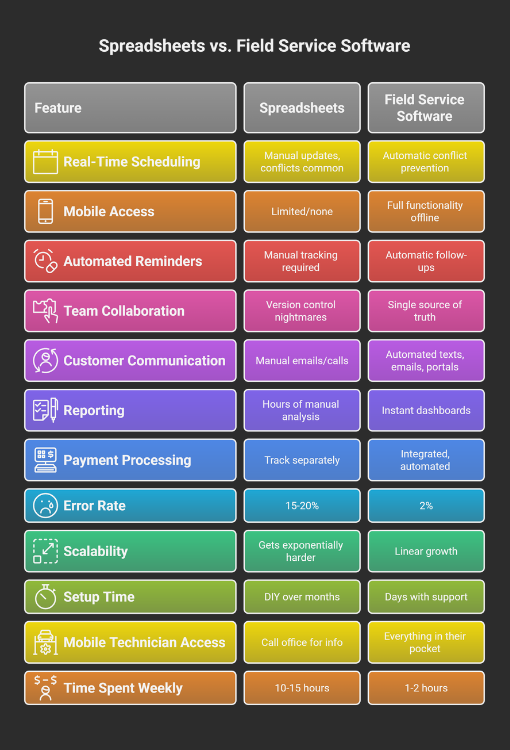
The fundamental difference is automation versus manual work. Excel and Google Sheets require you to manually enter data, update multiple tabs, track due dates in your head, prevent conflicts yourself, and spend hours generating reports. Field service management software automates these tasks—preventing double-bookings in real-time, sending automatic reminders, syncing information across all users instantly, and generating reports with one click. Spreadsheets have 15-20% error rates compared to under 2% for automated systems. Additionally, spreadsheets don’t scale—each new team member exponentially increases complexity, while software scales linearly.
Do I need field service software if I only have 2-3 employees?
Yes, if you’re experiencing any of the seven warning signs described in this article. Small team size doesn’t protect you from the hidden costs of spreadsheet management—you’re still losing time to administrative tasks, risking scheduling conflicts, and missing follow-up opportunities. In fact, smaller businesses benefit even more from efficiency gains because every hour saved has a bigger proportional impact. Additionally, implementing proper systems while you’re small creates a foundation for growth rather than having to reactively fix broken systems later when you’re overwhelmed.
What field service management software do contractors in Twin Falls and Magic Valley use?
Service contractors throughout Magic Valley—including Twin Falls, Jerome, Burley, and surrounding communities—are increasingly adopting integrated field service management solutions that address regional needs. FieldServ AI, built in partnership with LeadProspecting AI, is designed specifically for small to mid-sized service businesses and includes features important to Idaho contractors: offline capability for rural service areas, multi-city route optimization, local support from people who understand the regional market, and pricing that works for growing businesses. The Founders Club offers lifetime pricing starting at $70/month, significantly less than national competitors that charge $300-400/month.
Can field service software integrate with QuickBooks or other accounting tools I already use?
Most quality field service management software offers integration with popular accounting platforms like QuickBooks, allowing automatic synchronization of invoice and payment data. This eliminates duplicate data entry and ensures your accounting records stay current without manual updates. When evaluating software, specifically ask about accounting integrations you currently use and whether they’re included in the base price or require additional fees. FieldServ AI includes accounting integration capabilities, allowing your job completion, invoicing, and payment data to flow seamlessly into your existing financial systems.
Ready to leave spreadsheet chaos behind? Visit FieldServ.ai to claim your Founders Club pricing before spots run out.
Written by
FieldServ AI Team
Field service management insights from the FieldServAI team.
Related Articles

April Permit Delays Cost Magic Valley Contractors $2K+/Week
April permit delays are draining Magic Valley contractors $2K+ weekly. Learn how field service management software prevents the chaos and protects your revenue.

5 ROI Myths Costing Contractors $50K a Year (And the Math That Disproves Each One)
Five common beliefs stop contractors from adopting field service software. University and MIT research disproves each one. This post shows the real math behind what spreadsheets, missed calls, and slow invoicing cost.

Seasonal vs. Year-Round Pricing: Which Drives More Profit for Magic Valley Contractors
Seasonal pricing can boost profit 4-15% above flat rates. Learn which strategy—seasonal, year-round, or hybrid—actually generates more profit for Magic Valley HVAC, plumbing, and electrical contractors.
See FieldServ AI in Action
Get a personalized demo and see how AI-powered field service management can transform your business.
Book Your Demo