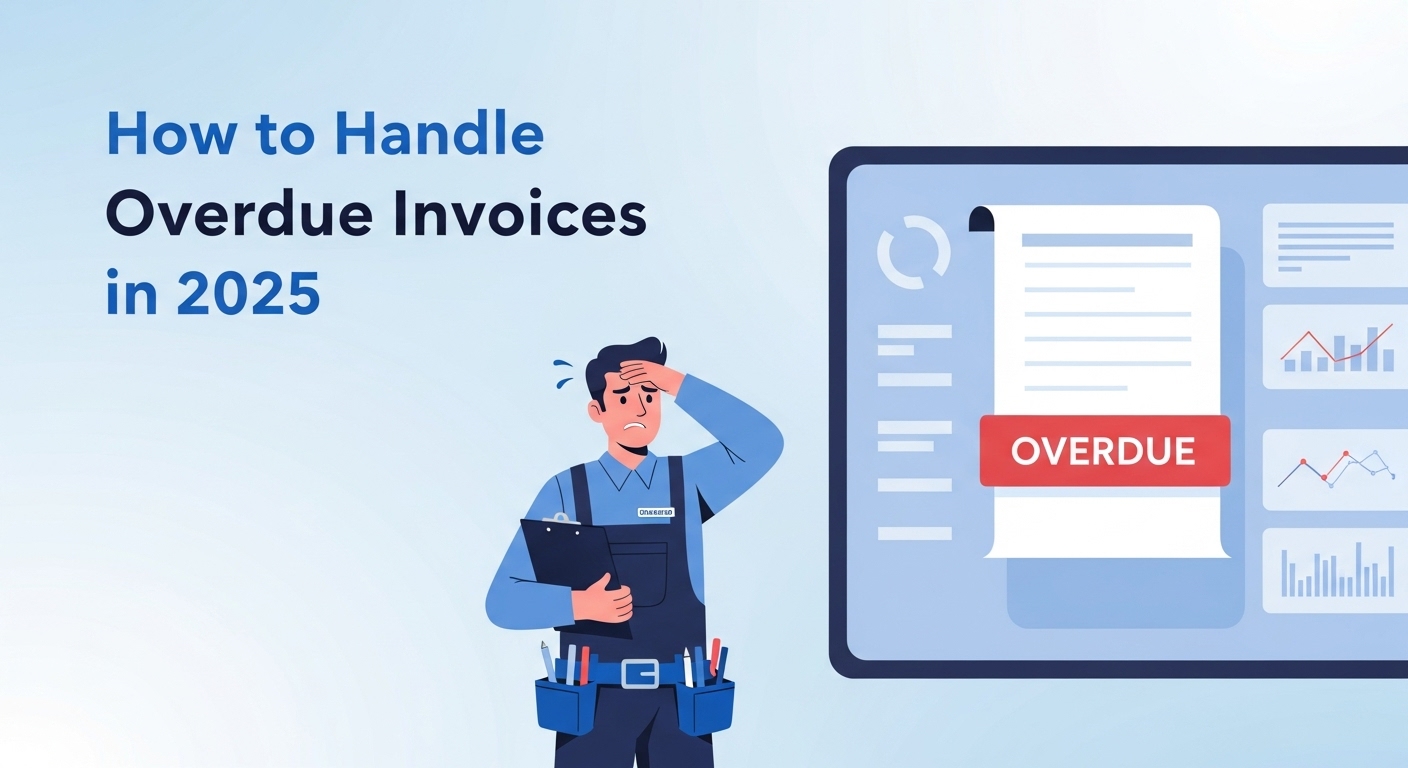
You’ve done the work. You’ve fixed the HVAC system, unclogged the drain, rewired the circuit. Your customer is happy. But three weeks later, you’re still waiting to get paid.
Sound familiar?
Late payments remain one of the biggest frustrations for field service professionals and contractors. According to industry research, 46% of field service businesses experience overdue payments at least once a month. In 2025, with economic uncertainty, tighter margins, and increasingly complex payment expectations, getting paid on time has become more challenging than ever.
The good news? It doesn’t have to be this way. Smarter field service invoicing practices—powered by automation and better communication—can dramatically reduce overdue payments and keep your cash flow steady. This guide will show you exactly how to make it happen.
The Real Cost of Overdue Invoices for Field Service Pros
Late payments aren’t just an inconvenience. They create a domino effect that can cripple your field service business cash flow:
Delayed cash flow means you can’t pay your suppliers on time, which damages vendor relationships and may cost you early payment discounts. Project delays happen when you can’t afford to buy materials for the next job. Payroll stress sets in when you’re scrambling to cover employee wages. And perhaps most critically, stunted growth occurs because you can’t invest in new equipment, marketing, or hiring.
For service businesses in smaller markets like Twin Falls or Boise, where word-of-mouth and repeat customers drive most of your revenue, this problem compounds quickly. A reputation for disorganization—even if it’s just your invoicing system—can cost you referrals.
The numbers tell the story: contractors who wait over 30 days for payment see 20% lower recurring client rates. That’s not because their work quality dropped. It’s because poor invoicing practices signal unprofessionalism, and customers remember that.
Common Causes of Late Payments (And How to Prevent Them)
Before we dive into solutions, let’s identify why payments get delayed in the first place. Understanding these root causes is the first step toward fixing them.
The Top 5 Preventable Invoicing Mistakes:
1. Unclear payment terms: You finished the job but never clearly communicated when payment is due or what methods you accept.
2. Missing documentation: The invoice lacks details—no itemized breakdown, no job photos, no proof of work completed.
3. Manual invoicing errors: Typos in the amount, wrong customer name, duplicate invoice numbers—these mistakes erode trust and delay payment.
4. Poor timing: You send the invoice a week after completing the job, when the customer has already moved on mentally.
5. No follow-up system: You assume the customer got the invoice and will pay on time. No reminders. No check-ins. Just hope.
Here’s the reality: most late payments aren’t because customers refuse to pay. They’re because of miscommunication, forgotten deadlines, or invoices that never reached the right person.
Real-world example: A local HVAC company in Boise reduced their average payment time from 38 days to 14 days simply by implementing automated payment reminders. They didn’t change their service. They didn’t lower their prices. They just fixed their invoice management for contractors.
The lesson? Most payment problems are system problems, not customer problems.
Smart Automation Tools That Help You Get Paid Faster
Technology has transformed field service invoicing. What used to take hours of manual work—creating invoices, tracking due dates, sending reminders—can now happen automatically while you focus on the next job.
Modern automated invoicing software handles the entire payment cycle:
- Auto-populated invoices pull data directly from your job records (service details, photos, time stamps, materials used)
- Instant delivery sends invoices to customers the moment you mark a job complete
- Scheduled reminders follow up automatically at 3 days, 7 days, and 14 days
- Real-time payment tracking notifies you the second a payment comes through
- Multiple payment options let customers pay by card, ACH, or digital wallet with one click
The impact is significant. Businesses using automated invoicing report an average payment time of 12-18 days compared to 35-45 days for manual invoicing.
How Automation Streamlines Field Service Invoicing
Still creating invoices manually? Here’s what it’s really costing you:
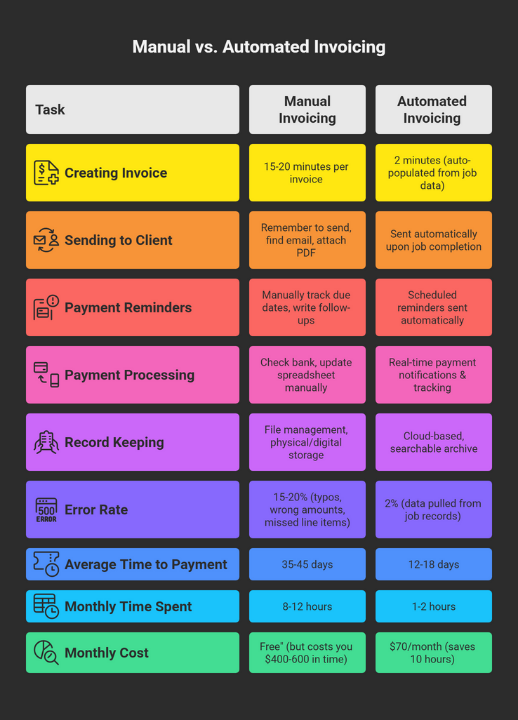
The true cost comparison between manual and automated invoicing for field service businesses handling 30-40 jobs monthly.
That 10-hour monthly time savings isn’t just convenience—it’s 10 more billable hours you could be earning. At an average rate of $75/hour for skilled trades, that’s $750 in additional revenue every single month, or $9,000 per year.
But the benefits go beyond time savings. Automated systems reduce errors from 15-20% down to less than 2%. Fewer errors mean fewer disputes, faster approvals, and better customer relationships.
Platforms like FieldServ Ai integrate invoicing directly into your job management workflow. The moment you complete a job and collect a signature, the system generates and sends a professional invoice automatically. No separate apps. No manual data entry. No forgotten follow-ups.
Best Practices to Encourage On-Time Payments
Even with automation, how you structure your invoicing process matters. These proven best practices for contractors will help you get paid faster, whether you’re using advanced software or refining your current system.
Set Clear Payment Terms Upfront
Don’t wait until after the job to discuss payment. Before you start work:
- State your payment terms clearly in your quote or contract (e.g., “Payment due within 14 days of invoice”)
- Specify accepted payment methods
- Explain any late fees (typically 1.5-2% per month after 30 days)
- For larger jobs, consider requiring a deposit upfront
Clarity eliminates confusion. Customers respect professionals who are upfront about expectations.
Send Professional, Itemized Invoices
Your invoice is often the last impression you make. It should reinforce your professionalism, not undermine it.
Every invoice should include:
- Your business name, logo, and contact information
- Invoice number and date
- Customer name and service address
- Detailed breakdown of services performed
- Materials and parts used (with costs)
- Labor hours or flat fee
- Photos of completed work when relevant
- Clear payment terms and due date
- Multiple payment options with easy links
The more professional and detailed your invoice, the faster it gets approved and paid.
Use Friendly Payment Reminders Before the Due Date
Here’s a strategy many contractors miss: send a reminder before the payment is overdue, not after.
A friendly check-in 2-3 days before the due date accomplishes two things:
- It catches customers who simply forgot
- It gives them time to resolve any payment issues before they’re officially late
Many Idaho-based service businesses report that text reminders get faster responses than emails. If your customer prefers texts, use that channel. The goal is to meet them where they are.
Here’s what a professional automated payment process looks like:
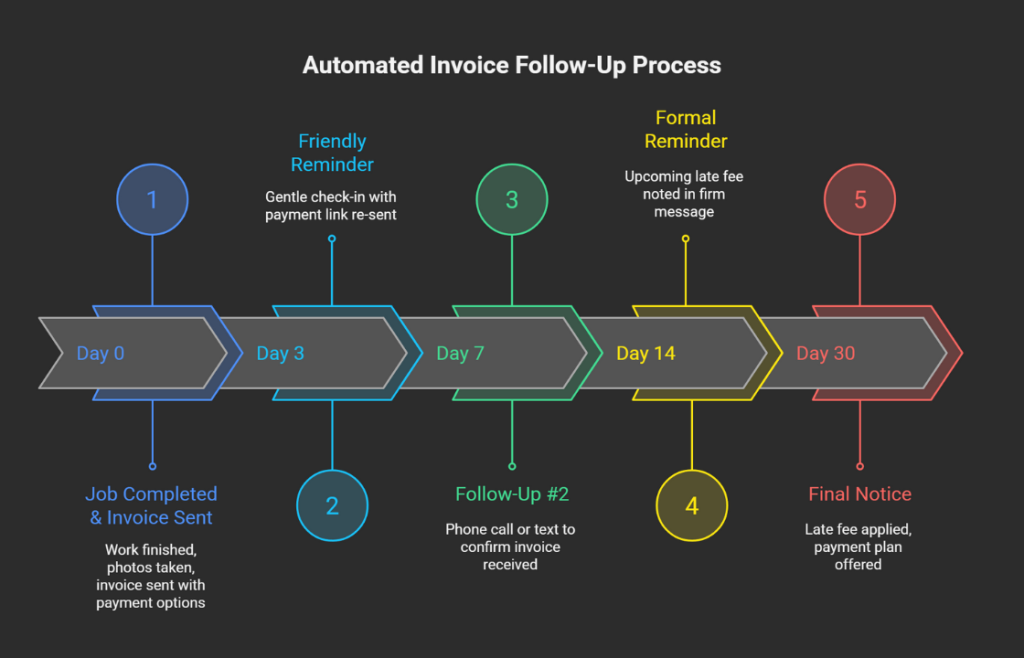
A proven 30-day automated follow-up timeline that maintains professionalism while ensuring payment.
Notice how the tone escalates gradually—from friendly reminder to formal notice—while maintaining professionalism throughout. This graduated approach recovers 85% of payments by Day 14, without damaging customer relationships.
Offer Multiple Payment Options
Friction is the enemy of fast payment. The easier you make it to pay, the faster you’ll get paid.
Your invoicing system should support:
- Credit and debit cards
- ACH bank transfers
- Digital wallets (Apple Pay, Google Pay)
- Payment plans for larger invoices
Some contractors still only accept checks. While that might work for some customers, you’re losing 5-10 days in the mail and deposit process. Digital payments clear in 1-2 business days.
Modern platforms like FieldServ Ai integrate payment processing directly into the invoice. Customers click a button, enter their payment info, and you get a notification within seconds. No phone calls. No waiting for checks. No trips to the bank.
What to Do When Payments Are Already Overdue
Despite your best efforts, some invoices will still go overdue. When that happens, having a structured recovery process is essential. The key is to be persistent without being aggressive, professional without being personal.
If you’re already dealing with overdue payments, follow this proven recovery timeline:
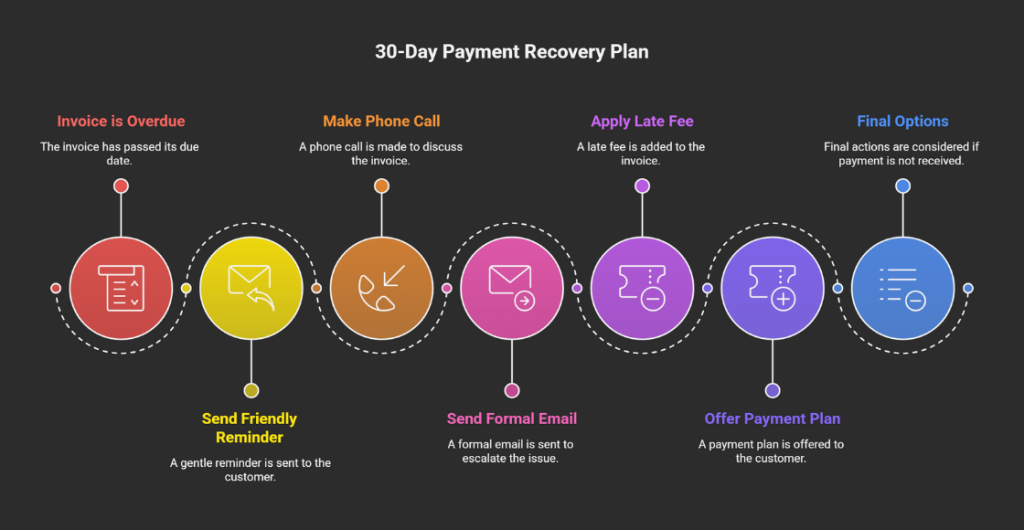
Your step-by-step guide to recovering overdue payments while maintaining customer relationships.
Days 1-7: Stay Friendly and Assume Good Intent
Most late payments are honest oversights. Your first reminder should reflect that.
Day 3 Follow-Up: “Hi [Name], just checking in! I wanted to make sure you received the invoice for [service] completed on [date]. If you have any questions about the charges, I’m happy to walk through them. Here’s the payment link again for your convenience: [link]”
This approach works because it’s helpful, not accusatory. You’re giving the customer an easy out if they genuinely forgot.
Day 7 Follow-Up: If there’s still no response, make a phone call or send a text. Sometimes emails get buried. A direct call shows it’s important while still maintaining a friendly tone.
“Hey [Name], this is [Your Name] from [Company]. I’m following up on the invoice from [date]. Just wanted to make sure everything looked good on your end and see if there were any questions.”
Often, this call reveals the real issue: they’re waiting for insurance approval, they need to speak with their spouse, or they simply forgot. Now you can work together on a solution.
Days 10-14: Shift to Formal Communication
If friendly reminders haven’t worked, it’s time to be more direct.
Day 12 Formal Email: “Dear [Name],
I’m reaching out regarding invoice #[number] dated [date] for [service], which is now [X] days overdue. The outstanding balance is $[amount].
Please submit payment within the next 3 business days to avoid a late fee of [X%] being applied to your account.
If there’s an issue with the invoice or a payment challenge I should know about, please contact me immediately so we can work out a solution.
Payment can be made here: [link]
Thank you, [Your Name]”
This message is firm but professional. You’re clearly stating the situation and the consequence while still leaving room for dialogue.
Days 15-22: Apply Late Fees and Offer Payment Plans
Day 14: Apply the late fee you outlined in your original terms. Update the invoice and send it again with a note that the late fee has been added.
Day 20: If still no payment, offer a payment plan:
“Hi [Name],
I understand that sometimes cash flow gets tight. I’d like to work with you to get this resolved. Would a payment plan work better? We could split the $[amount] into [2-3] payments over the next [timeframe].
Let me know if that would help, and I’ll get it set up today.”
This approach often succeeds where demands fail. You’re showing flexibility while still making it clear that payment is required.
Days 23-30+: Final Options
If you’ve reached 30 days with no payment and no communication, you have three options:
1. Collections agency: They’ll pursue the debt for a percentage (typically 25-50%) of what they collect.
2. Small claims court: For amounts under your state’s small claims limit (usually $5,000-$10,000), this is often worth pursuing.
3. Write it off: Sometimes the cost of collection exceeds the debt. You can write it off as a bad debt tax deduction and move on.
The key to this entire process? Document everything. Save all emails, texts, and call notes. If you end up in small claims court or working with a collection agency, you’ll need proof of your collection efforts.
5 Signs It’s Time to Upgrade Your Invoicing System
How do you know when your current invoicing process is holding you back? Here are the clear warning signs:
1. You’re spending more than 2 hours per week on invoicing tasks
If you’re manually creating invoices, tracking payments in spreadsheets, and setting calendar reminders to follow up, you’re wasting billable time. That’s time you could be earning money on actual jobs.
2. You frequently discover invoices you forgot to send
This is a cash flow killer. Every forgotten invoice is money you’ve already earned but can’t access. If this happens more than once a month, your system is broken.
3. Customers regularly claim they “never got” your invoice
When invoices go through email, they can end up in spam folders or get overlooked in crowded inboxes. Modern systems provide delivery confirmation and read receipts, so there’s no ambiguity.
4. You can’t easily answer “Who owes me money right now?”
If it takes you more than 30 seconds to pull up a list of outstanding invoices and their ages, you don’t have proper visibility into your receivables. That’s a serious business risk.
5. You’re using 3+ separate tools for quotes, scheduling, invoicing, and payments
When your systems don’t talk to each other, information gets lost. You’re re-entering the same data multiple times. And the risk of errors multiplies with every hand-off.
If you recognized yourself in two or more of these signs, it’s time to consolidate your tools.
This is where integrated platforms make a real difference. Tools like FieldServ Ai, built in partnership with LeadProspecting AI, centralize everything—client data, job scheduling, invoicing, payments, and customer communication—in one place.
You’re not juggling multiple logins, subscriptions, and databases. Everything flows seamlessly from the moment a lead comes in through LeadProspecting AI’s CRM, to job completion in FieldServ Ai, to automatic invoicing and payment tracking.
For contractors serious about growth, this integration eliminates the administrative chaos that keeps you working in your business instead of on your business.
A Better Way Forward
The FieldServ Ai Founders Club offers an opportunity to lock in lifetime pricing on a complete field service management system. For the first 200 businesses that join, pricing starts at just $70/month (or $600/year) with no contracts and no hidden fees.
Compare that to the $400+ monthly costs of piecing together separate tools for CRM, scheduling, invoicing, and payments—tools that don’t even talk to each other.
Founders Club members get:
- Full CRM and field service app access
- Automated invoicing with payment tracking
- Priority onboarding and VIP support
- Lifetime locked-in pricing
- Early access to new features
It’s not just about saving money. It’s about getting systems that actually work together, so you can spend less time on paperwork and more time growing your business.
Frequently Asked Questions About Field Service Invoicing
What is field service invoicing and why does it matter in 2025?
Field service invoicing is the process of billing customers for on-site work like repairs, installations, or maintenance. In 2025, with increasing competition and tighter margins, professional invoicing separates successful contractors from struggling ones. Your invoicing system directly impacts cash flow, customer satisfaction, and business growth.
How can contractors get paid faster for field service jobs?
The fastest way to get paid is to send professional, detailed invoices immediately after job completion with multiple easy payment options. Automated reminders at 3, 7, and 14 days dramatically improve payment speed. Businesses using automated systems report getting paid in 12-18 days versus 35-45 days for manual processes.
What’s the best way to handle overdue invoices professionally?
Start with friendly reminders assuming good intent, then escalate gradually to formal notices with late fees. The key is being persistent without being aggressive. Follow a structured timeline: friendly reminder (Day 3), phone call (Day 7), formal notice (Day 12), late fee (Day 14), payment plan offer (Day 20), and final options (Day 30+).
How does automated invoicing software help small service businesses?
Automated invoicing eliminates manual data entry, reduces errors from 15-20% to under 2%, sends reminders automatically, and provides real-time payment tracking. This saves 8-10 hours per month, reduces late payments by 60%, and improves cash flow predictability. The time savings alone often exceeds the software cost.
What are the best invoicing practices for contractors?
Best practices include: setting clear payment terms upfront, sending itemized invoices immediately after job completion, including photos of completed work, offering multiple payment options, sending friendly reminders before the due date, and maintaining professional communication throughout the collection process.
How can I improve cash flow for my field service business?
Cash flow improvement starts with faster invoicing and collection. Send invoices within 24 hours of job completion, automate payment reminders, offer convenient payment methods, require deposits on large jobs, and maintain a consistent follow-up process. Consider using integrated software that tracks receivables and alerts you to aging invoices.
When should I charge a late fee for unpaid invoices?
Late fees should be clearly stated in your original terms and typically applied after 30 days overdue. The standard is 1.5-2% per month. Send a formal notice 3-5 days before applying the fee, giving the customer one final chance to pay before additional charges. This approach is firm but fair.
What is invoice reminders automation and how does it work?
Invoice reminders automation sends scheduled follow-ups to customers based on payment status. The system tracks when invoices are sent and automatically sends gentle reminders before the due date, followed by increasingly formal messages if payment isn’t received. This ensures no invoice falls through the cracks without requiring manual effort.
What invoicing tools are best for contractors in Idaho and surrounding regions?
Idaho contractors benefit from invoicing systems that integrate with local payment preferences (many prefer text reminders over email) and support the specific needs of service businesses. Tools like FieldServ Ai offer Idaho-based support, understand regional business patterns, and provide all-in-one solutions that eliminate the need for multiple software subscriptions.
How do I track client payments and overdue accounts efficiently?
Modern invoicing software provides real-time dashboards showing all outstanding invoices, their age, and payment status. Look for systems that send automatic alerts when invoices become overdue, generate aging reports, and integrate payment tracking with your job management. This visibility is critical for maintaining healthy cash flow.
Take Control of Your Cash Flow Today
Late payments don’t have to be part of doing business. With the right field service invoicing strategies and systems in place, you can get paid faster, reduce collection headaches, and build a more profitable business.
The seven strategies we’ve covered—from understanding the real cost of overdue payments to implementing automated systems and professional collection processes—give you a complete framework for transforming your invoicing.
Remember: professional invoicing isn’t just about getting paid. It’s about respecting your own work, setting proper business boundaries, and building a sustainable company that can grow and thrive.
Ready to stop chasing payments and start focusing on what you do best?
FieldServ Ai, in partnership with LeadProspecting Ai, provides the complete toolkit field service professionals need: automated invoicing, integrated payments, CRM, scheduling, and customer communication—all in one platform.
The Founders Club is limited to the first 200 businesses and offers lifetime pricing starting at just $70/month. No contracts. No hidden fees. Just the tools you need to run a more professional, profitable operation.
Learn more and claim your Founders Club pricing at FieldServ.ai
Spots are filling fast. Don’t let outdated invoicing systems hold your business back in 2025.